.merlin – An AIR Font Organizer

Tuesday, October 7th, 2008 | Projects


Version 1.8.1, Updated July 20, 2009
  • Compatibility: AIR 1.5 and later (ActionScript 3.0)
  • File Size: About 375Kb
  • Change Log

Download Now (1.8.1)

Please upgrade your Flash Player This is the content that would be shown if the user does not have Flash Player 9.0.115 or higher installed.


What’s New

  • Fixed null file extension bug

Description

.merlin is an Adobe AIR based utility. If you’re like me, and have a thousands of mis-labeled fonts scattered in endless folders, this utility is for you. I had a folder with roughly 7000 fonts, it would bring Windows to a halt just opening the folder. I also had a lot of duplicate fonts because they were all labeled incorrectly.

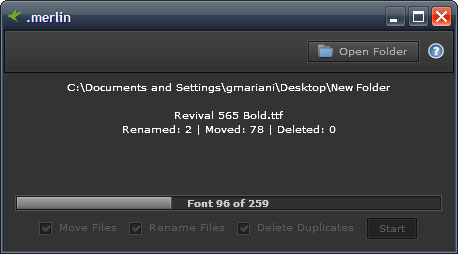
This utility will extract the actual font name, and rename the file based off of that. Then put that font into a folder of the first letter. So Arial would go in the “a” folder. While it’s processing fonts, it will display which font is being processed. Below the progress bar will update with the current font of the total being processed (ie. 15 of 200). If for some reason .merlin runs into any errors, it will stop processing fonts and report the specific font it had a problem with.

Some of the options you can configure for processing is to move, rename, or delete files. Each has a check box to enable or disable each.

Features

  • Read OTF font files.
  • Read TTF font files.
  • Read Type1 (AFM, PFM, PFB, INF) font files.
  • Auto-update capability

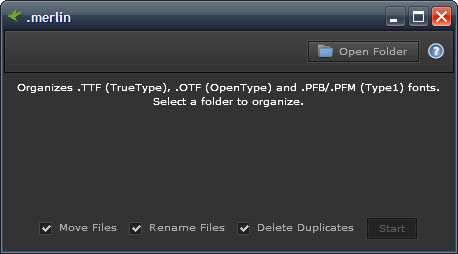
.merlin's basic UI
.merlin's basic UI

.merlin sorting fonts
.merlin sorting fonts

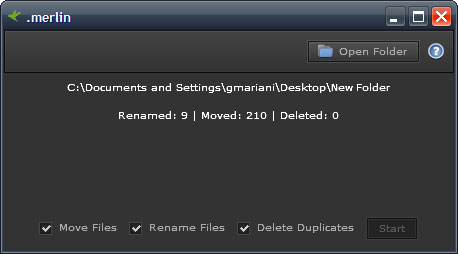
.merlin after it has finished sorting

.merlin after it has finished sorting

Usage

  • Open .merlin
  • Select the folder which contains all of your fonts. This folder should have all the fonts and folders of fonts you want to organize. (It is recommended to use a copy of your fonts in case it doesn’t work properly. )
  • Click the start button and wait till the finished message appears.

Alternate Downloads

.merlin has recently been added to Softpedia. It is also available on the Adobe AIR Marketplace.

Change Log

.merlin 1.8.1 for Adobe AIR 1.5 (July 20, 2009)

  • Fixed null file extension bug

.merlin 1.8.0 for Adobe AIR 1.5 (May 29, 2009)

  • Improved Type1 support
  • Fixed bug with OTF parsing
  • Fixed processing of fonts, app no longer locks on processing lots (1,0000+) fonts
  • Updated About window

.merlin 1.7.0 for Adobe AIR 1.0 (August 4, 2008)

  • Now handles Type1 fonts : .pfb, .pfm (Partial support), .afm, .inf
  • Can now choose whether to delete duplicates or not
  • Restores file extensions based on internal file data
  • Fixed rare issue where fonts would be renamed to nothing

.merlin 1.6.0 for Adobe AIR 1.0 (July 22, 2008)

  • Smoothed images
  • Embedded fonts for smooth text
  • Restructured internal code
  • Maintains file extension (ttf and otf)
  • Updated installed program name

.merlin 1.5.2 for Adobe AIR 1.0 (July 15, 2008)

  • Improved auto – update

.merlin 1.5.1 for Adobe AIR 1.0 (May 15, 2008)

  • Removed status bar

.merlin 1.5 for Adobe AIR 1.0 (May 14, 2008)

  • Added an auto-update feature
  • Added an actual about window
  • Now uses native menus

.merlin 1.0 for Adobe AIR 1.0 (February 25, 2008)

  • Updated for Adobe AIR 1.0

.merlin 1.0 for Adobe AIR B3

  • Initial release. Supports OTF and TTF font files.

Need Help?

Feel free to e-mail me a question. When you e-mail your question, please include pictures (if applicable) that clearly demonstrates the problem and provide a brief explanation.

Author: Gabriel Mariani, (e-mail: gabriel -at- coursevector.com)
Copyright 2010, CourseVector (This work is subject to the terms here.)

Tags: ,

27 Comments to .merlin – An AIR Font Organizer

[...] .merlin » Description : TrueType font organizer. Retrieves font name from the file, renames file and organizes based on first letter into a folder. [...]

[...] .merlin – Font Organizer [...]

Toni
March 25, 2009

Congrats for the idea and the effort! It’s a really necessary app that will help me a lot!
One question: I’m using it on a folder with 37.000+ fonts in different subfolders and after 2 hours it’s still in working process. Should I wait or maybe it is not working properly?

Thank you! :)

gabriel
March 25, 2009

Hmm…. That’s a good question. It’s probably not working properly (to give you a reference, I sorted about 7,000 fonts in about 1~ min). I’d say maybe break it up into 10,000 font chunks and let it work on it that way. I’ll have to work on it more to allow it to not lock up on such large amounts. I just haven’t had time to update it in a while maybe that’ll be the next thing =) Thanks for using merlin!

[...] .merlin » Description : TrueType font organizer. Retrieves font name from the file, renames file and organizes based on first letter into a folder. [...]

[...] 4. .merlin-Font Organizer [...]

[...] .merlin-Font Organizer   [...]

[...] .merlin » Description : TrueType font organizer. Retrieves font name from the file, renames file and organizes based on first letter into a folder. [...]

[...] .merlin – An AIR Font Organizer merlin is an Adobe AIR based utility which extract the actual font name, and rename the file based off of that. Then put that font into a folder of the first letter. So Arial would go in the “a” folder. Some of the options you can configure for processing is to move, rename, or delete files. It reads OTF, TTF, Type1 (AFM, PFM, PFB, INF) font files. [...]

[...] .merlin As for .merlin there were even more internal changes. I completely overhauled the Type1 support and it more thoroughly reads the font to extract the correct file name. I also fixed some bugs with the OTF parser. And finally, the one that annoyed me the most, was making it not lock the GUI while it was processing. So now if the application locks up then it probably really did mess up =). [...]

[...] .merlin .merlin is a free font organizer. It handles OTF, TTF and Type1 fonts. [...]

Liam
July 13, 2009

this just made 805 of my fonts 0kb and unusable, came to an error saying it couldn’t rename one of the files and just stopped.

Liam
July 13, 2009

ok, I restored my fonts.

You may want to warn users not to run this in the default fonts folder on windows (C:\WINDOWS\Fonts) as it will only corrupt the fonts.

gabriel
July 13, 2009

I do have a warning (it’s the second step on how to use .merlin). Maybe i need to make it more obvious in the future. Also it probably had an error renaming the file as it was probably in use by Windows. I’m sorry to hear that it caused you errors but you should really only be renaming fonts for archival use, not in the Windows/fonts folder.

Also, if you can pin-point the actual font that caused the error and send that font to me. I will try to update .merlin to handle that specifically.

[...] .merlin .merlin is a free font organizer. It handles OTF, TTF and Type1 fonts. [...]

Ciro
July 15, 2009

Help me please!
I use .merlin to organize my fonts. But I have lost all!
What I need to do to recovery my fonts?

PS.: I don’t have backup

gabriel
July 16, 2009

I’m not sure you can recover your files. Were they deleted or just overwritten wtih a file that is 0kb? If the files were deleted, then you might have a chance at recovering them. If they were overwritten you can hope windows has a saved version otherwise you’re outta luck.

Also what folder were you organizing? Were you like Liam trying to organize the Windows/font folder? There really isn’t ever a need to organize that folder as Windows already reads the Fonts. I do recommend making a backup before organizing your files. I’m not sure what else I can help you do.

eydryan
July 29, 2009

you really need to disable the ability to sort the windows fonts folder as a novice user will not see folders in windows/fonts and therefore think all fonts are gone. also, an auto backup option would be nice, just in case.

gabriel
July 30, 2009

Yeah, i never really considered people would try to sort the windows folder. That’s a good idea though, when i get a chance (busy at work) i’ll add that feature in. As for a backup feature, all it would do is copy the font. Although i already recommend people make a copy before sorting. Not sure making an optional backup would be any different than just optionally copying the folder.

eydryan
July 31, 2009

It’s just that as a programmer you will assume your users are not uneducated and lazy. Which they usually either are or behave like :)

Anyway, I have this error (which interrupted the whole process by the way, that sucks): 3003

Any clues as to a resolution? I know for a fact there are some zero-byte fonts in that folder which I hoped .merlin would eradicate.

[...] .merlin » Description: TrueType font organizer. Retrieves font name from the file, renames file and organizes based on first letter into a folder. [...]

[...] .merlin » Description: TrueType font organizer. Retrieves font name from the file, renames file and organizes based on first letter into a folder. [...]

[...] .merlin »Description: TrueType font organizer. Retrieves font name from the file, renames file and organizes based on first letter into a folder. [...]

Nat Belza
November 20, 2009

Hello Gab,

Thanks for this great app. I got a question, does this work with family fonts?
Suggestion, can you add a feature that will group a whole family font in a folder in conjuction with the current sorting feature?

Kiind regards,

-Nat

[...] Merlin te ayuda a order tus fuentes de forma alfabética y en carpetas mediante la primer letra del alfabeto. [...]

[...] Merlin te ayuda a order tus fuentes de forma alfabética y en carpetas mediante la primer letra del alfabeto. [...]

[...] .merlin – An AIR Font Organizer [...]

Leave a comment

Please upgrade your Flash Player To submit a comment, you must have Flash Player 9.0.0 or higher installed. I use a flash form here to help prevent spam.

Search

Categories